The best part about my job is that I get to meet L&D leaders/CHRO’s of organizations. You hear from them about various pain points, cutting-edge initiatives that they’re taking in their organization.
Recently, I met a CHRO of a leading insurance company. In our meeting, he mentioned:
"Despite having the latest
Learning Experience Platform
(LXP), the adoption of LMS in
the company was very bad (5%-
10%). People don’t go to the
platform"
With a lot of curiosity, I asked whether I could look at your platform, to which the CHRO readily agreed and asked his team to set up a follow-up meeting to showcase the platform.
I couldn’t sleep peacefully that night, I kept wondering what the issue of dismal adoption would be if the client was using the latest LXP.
Well, all the curiosity and built-up to the meeting was diffused in the first 15 minutes when I checked their LXP.
Here are the five tips or recommendations to increase the adoption of a learning platform:
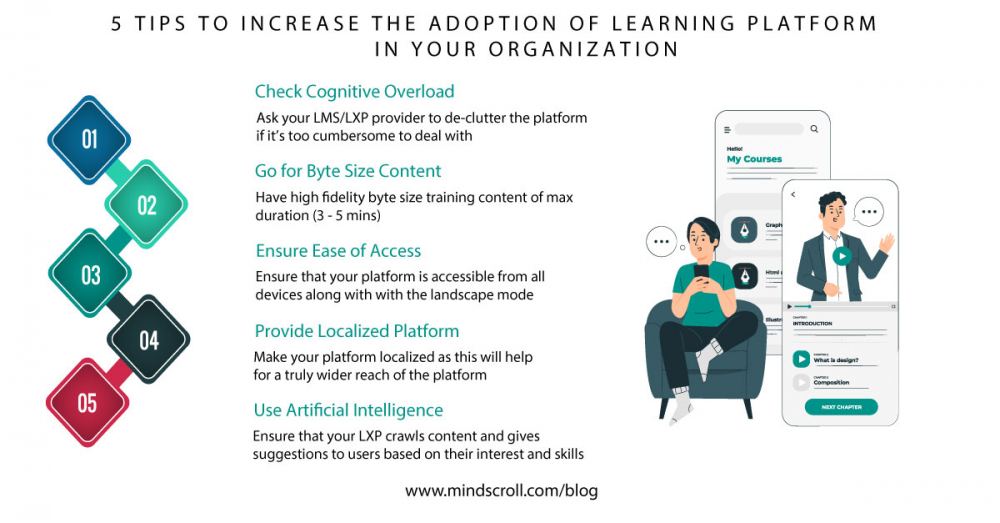
1. Check Cognitive Overload
The LXP’s today are way cumbersome to deal with. Even an administrator, 90% of the activities are:
• Add Content
• Add User
• Create Course
• Assign Course
• View Reports
Please ask your LMS/LXP provider to de-clutter the platform.
2. Remember Content is the King!! (Go for Byte Size Content)
Users will go to the LXP to access the content. No matter how dynamic/cutting-edge an LXP may be, if the content is not good, adoption rates would be low. Gone are the days where we had 2 hours – 3 hours long courses. We need to have high fidelity byte size content of (max 3mins – 5mins).
3. Ensure Ease of Access of learning platform
As we are competing with the likes of Netflix, Amazon Prime – Need to ensure that the learning platform is accessible from all smartphones, tablets, and workstations. In addition, the landscape mode should be seamlessly available. I’ve noticed that on many platforms the landscape view is restricted.
4. Provide a Localized Platform
This is helpful for a truly wider reach of the platform – especially when a part of the audience is retail store employees/blue-collar factory workers.
5. Use Artificial Intelligence to deliver a personalized learning experience
There is no dearth of learning content available online. LXP should be able to crawl content and give suggestions to users based on their interests and skills
So what are you waiting for? Get the most out of MindScroll today!
Check our blog for resources you and your team may need.
LMS, Learning Management System, Cloud LMS, Moodle Alternative, Learning Platform, Learning Technologies, Elearning